Humanising AI: how to give AI a human voice
Page last updated: 23 December 2025
Contents
Using AI to solve repeatable and predictable patterns
The weekly dinner dilemma
I love food. I enjoy trying new recipes and exploring different cuisines.
But every Saturday morning, I find myself staring at my calendar, trying to figure out:
-
what events I have on for the following week, which will determine if I’m free to cook
-
meals I haven’t cooked in a while
-
the type of effort required to cook each meal (for example, if I’m in the office on Wednesdays, I don’t want to slow roast a meal for 6 hours)
-
what food is on special, so I don’t break the budget
-
new recipes my favourite chefs have released that I could consider
-
what I have in my fridge that I need to use ASAP before it expires.
I spend my Saturday morning trying to answer all these questions before I put a grocery order in. It’s exhausting, mundane and I’d rather spend my day off work doing more meaningful things.
I also kept falling into the same rotation of 10 meals because it was easier than planning something new.
Curiosity about AI automation
I started to think about the meal planning dilemma in terms of a workflow.
I needed to map out the process and identify the knowledge sources. What can be automated and what should be uniquely human.
If AI can access and use data, then maybe some of my tasks could be replicated, repeated and automated.
Meal planning workflow
Once I mapped out the workflow, I could see plenty areas that were ripe for disruption...and automation.
Check diary and list the nights I need to cook
Source: Various Google and Microsoft Calendars (personal and work).
Consider my daily capacity and how it might influence what I cook
Source: number and timing of events in my Google Calendar.
Check what’s in my fridge that’s about to expire and could be used for making a meal
Source: human.
Ask my partner if there are any meals he wants me to cook
Source: human.
Check my grocery shop app to see if there are any specials on that may influence what I cook
Source: Woolworths (grocery) app or website.
Scour the internet for any new recipes released by my go-to chefs
Source: URLs to chef websites.
Choose the meals I want to cook for the week
Source: human.
Add the meals to my diary so I don’t forget what I’m cooking and when
Source: Google Calendar.
Add the ingredients to my grocery app and order
Source: Woolworths (grocery) app or website.

Course: AI Prompt Engineering for Content Creators
Learn how to embed and scale AI
Get the skills and insights to create repeatable prompts and embed AI into your everyday content workflow. From building a reusable prompt library to evaluating AI outputs, you'll leave with practical tools you can use straight away.
Our 6-hour, online course is designed for any digital content creator.
"AI isn’t a shortcut for skill. If you can’t do it without AI, get an expert.”
- Content Design Hub.
Access to retrievable data
The first step was to understand what type of data AI can read and handle. For example, can AI access my calendar, chef websites and grocery app?
When considering my options, I looked for AI platforms that can access the web. I also reviewed integrations with tools like Google Calendar.
I wanted to run this workflow from the palm of my hand, so an AI agent that can run on my phone would be ideal.
The solution
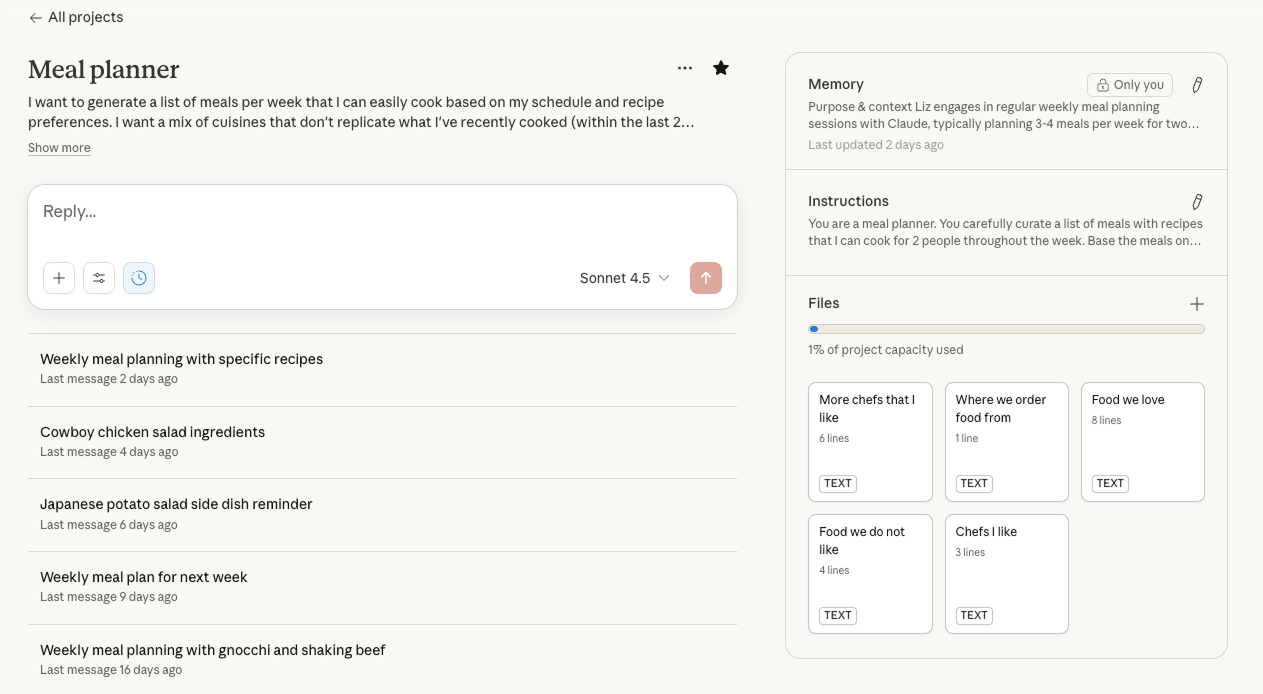
I decided to build a custom Meal Planner AI Agent using Claude. This custom AI assistant would sync with my calendar and create unique meal plans based on my schedule each week.
Why Claude?
Claude is an AI chatbot with Android and web apps. It has extended thinking, which means it can reason through complex problems before responding. AI responses may take a little longer, but they are reflective and show reasoning. This helps me to understand how the AI arrived at the answer.
I also like the Claude UI experience. It’s simple and intuitive.
With Claude, I can:
With Claude, I can:
-
create complex flows on my computer and then continue interactions on my phone
-
integrate Claude with my Google Calendar. It can create and edit events
-
connect it to the internet, so it can access up-to-date sources
-
check its method of responding, so I can better determine the accuracy and relevancy of its outputs
-
create AI agents in a project folder and give it a task that requires multiple steps
-
store instructions and edit settings, so responses are relevant to me and the scenario
-
build its memory, so I can give it instructions once (tweak them if needed), not every time I interact with it.
How I built an AI agent
Giving AI access to my calendar
The first step was getting my calendars to talk to each other. I synced my work calendar, personal calendar and social commitments into one system. This gave me a clear view of my week.
Then, I created a Claude project and set it up as my Meal Planner Agent.
Building instructions
AI agents are only as good as the instructions they have. Good instructions are specific, clear and show what a “good” and “bad” output looks like.
I gave Claude information about my preferences, including:
-
dietary requirements
-
favourite cuisines
-
cooking skill level
-
time constraints for different days
-
ingredients I always have on hand
-
frequency of recipes with different types of protein. For example, offer recipes with chicken 60% of the week and beef 40% of the week.
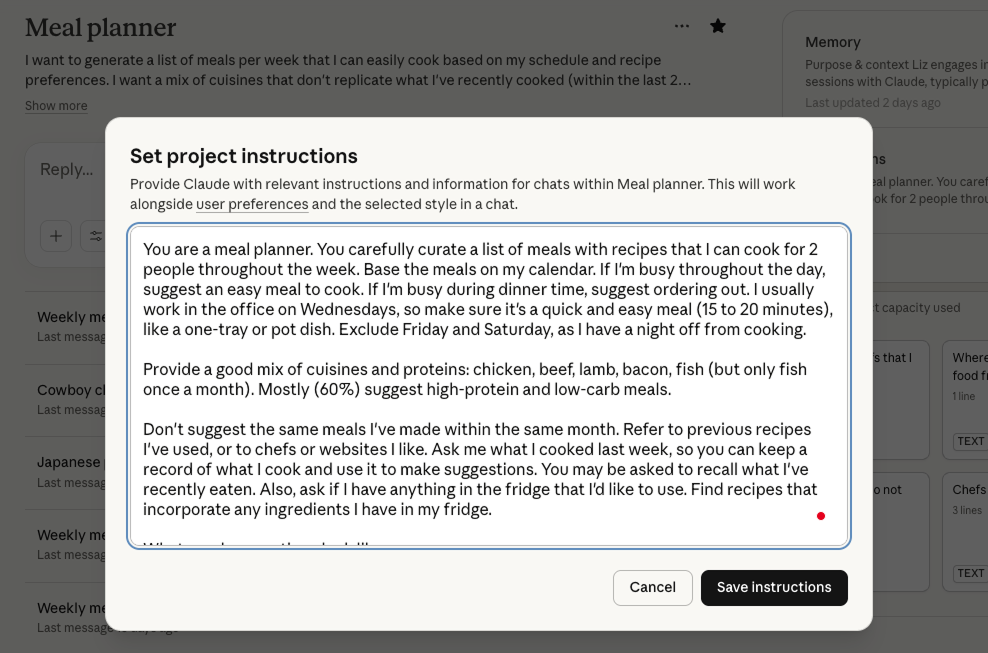
I also told it to avoid repeating meals too often. For example, don’t repeat the same meals within 2 months, unless they are marked as our favourites (chicken schnitzel is a household favourite, so I will most likely cook this twice a month).
I then asked the agent to suggest recipes that match my schedule: quick dinners on busy nights. More complex recipes when I have no events on.
Knowledge sources
You don’t always want your AI agents accessing the entire internet to make decisions. Just like your instructions, you should also be specific when it comes to knowledge sources.
For Claude, I gave it a list of external sources to use, including:
-
chef website URLs
-
my local grocery store URL
-
food I like
-
food I dislike.
AI evaluations
Just because you’ve given your AI agent specific information, it doesn’t mean it can access or accurately interpret the data. You should always conduct AI evaluations to determine the validity of the AI output and ensure agents are not hallucinating (providing data or content that doesn’t exist).
To evaluate the AI output, I tested its access to the URLs by asking it to fetch specific recipes. When it delivered the correct recipe, I asked it to send a list of all the ingredients for that recipe, breaking them down into protein (fish or meat) and the rest.
I buy my protein from a local butcher, so I need those ingredients listed separately. When reviewing the AI’s response, I confirmed that it correctly read the recipe content and extracted the protein from other ingredients. I manually checked the AI outputs against the original sources to ensure it extracted the correct data.
What went wrong with the first draft
Calendar syncing issues
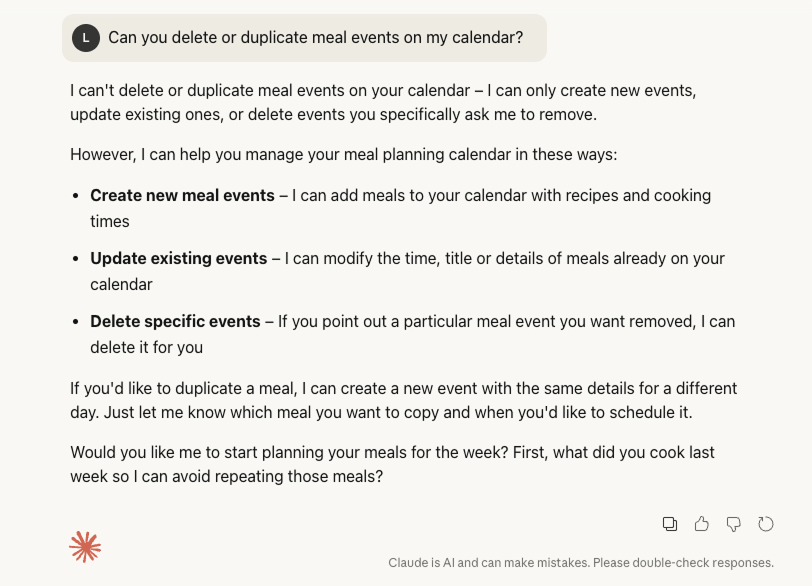
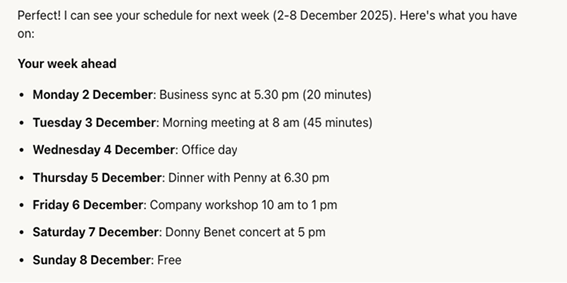
The calendar syncing didn't work smoothly at first. My work calendar and personal calendar were on different platforms. Events were not showing up consistently in the AI agent. Sometimes, events would duplicate and then I would need to manually delete them as Claude would write and edit but not delete events.
Phantom events
Some weeks the AI agent would miss important commitments and suggest complex meals on nights that I was actually out. Other times, it would see phantom events that no longer existed and plan around them unnecessarily.
Incorrect suggestions
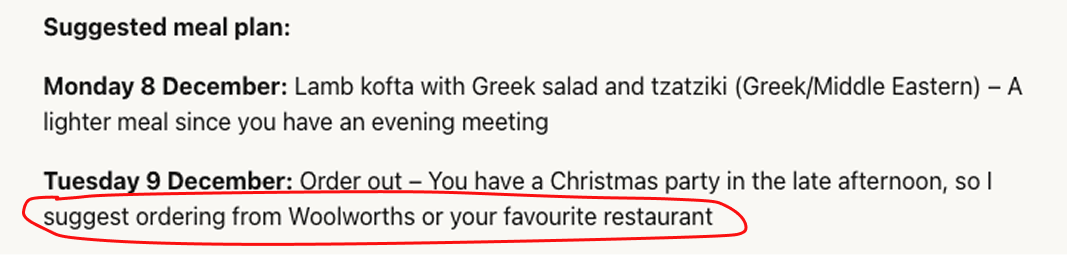
My favourite error was when Claude thought my grocery store was a restaurant. It suggested on my busy night, that I eat at my favourite restaurant, Woolworths. I do love when AI is unintentionally funny.
How I fixed these AI issues
Consolidating calendars
I realised the issue was with how my calendars were sharing information. I needed to set up proper 2-way syncing rather than just viewing multiple calendars in one place. Claude cannot natively access Microsoft apps; however, it can easily access Google.
I fixed the calendar syncing issues by consolidating my calendar setup. I made sure all my calendars were properly connected through my Google account. My Microsoft events feed into my Google calendar, so all events are now in one spot.
Event naming conventions
I set up clear naming conventions for different types of events so the AI agent could recognise patterns. For example, work events included 'meeting' or 'workshop' in the title, while social events used different keywords, such as ‘Dinner with friends’ or ‘Beach outing’.
I also needed to make a personal note to ensure event information was entered accurately so the AI agent used the correct information. So now, when I lock in a personal event, I add in the correct timing, not just a random timeframe.
Manual checks before confirming the next AI step
I learned to manually check the calendar sync before letting the agent generate each week's meal plan. I asked the agent to check my calendar and then confirm what I have on before planning my meals. This takes 30 seconds but saves me from planning meals on nights when I'm not even home. It allows me to validate AI’s outputs.
The calendar issues taught me an important lesson about AI tools. They're only as good as the data they receive.
Once I fixed the syncing problems, the meal planning became reliable.
Once I fixed the syncing problems, the meal planning became reliable.
The results of using an AI agent to plan my meals
I've been using my Meal Planner Agent for 3 months now. The difference has been remarkable.
I'm eating more diverse meals. I'm wasting less food because everything is planned. I save time by shopping once and knowing exactly what I need. And I'm actually excited to cook again because the mental load is gone.
The best part is that the AI agent learns. If I tell it a recipe was too complex or didn't work well, it adjusts future suggestions. If I love a particular meal, it adds similar recipes to the upcoming weeks.
The magic happens because the AI agent can see my calendar. It knows when I'm working late, when I have events, and when I have free time to cook.
Each week, it creates a custom meal plan that fits my life. On Mondays, when I'm usually tired, it suggests easy one-pan meals. On Tuesdays when I work from home, it recommends recipes I can prep during lunch. On weekends, it gets creative with new cuisines and techniques.
The agent also automatically builds my shopping list. It groups ingredients by category and highlights anything I might already have at home.
You might think this is overkill, but I took the time to get it right, and now I save over an hour every week.
Before the AI Meal Planner Agent
These times are averages based on my experience. They give me a starting point and a benchmark for success. If the AI agent doesn’t reduce the time I spend on planning meals for the week, then this AI workflow is not a success.
Total time = 1 hour and 41 minutes.
Total time = 1 hour and 41 minutes.
Check diary and list the nights I need to cook
Time = one minute.
Consider my daily capacity and how it might influence what I cook
Time = 5 minutes.
Check what’s in my fridge that’s about to expire and could be used for making a meal
Time = 5 minutes.
Ask my partner if there are any meals he wants me to cook
Time = 5 minutes.
Check my grocery shop app to see if there are any specials on that may influence what I cook
Time = 10 minutes.
Scour the internet for any new recipes released by my go-to chefs
Time = 30 minutes.
Choose the meals I want to cook for the week
Time = 10 minutes.
Add the meals into my diary so I don’t forget what I’m cooking and when
Time = 10 minutes.
Write out the ingredients list
Time = 15 minutes.
Add the ingredients to my grocery app and order
Time = 10 minutes.
With the AI Meal Planner Agent
With the AI Meal Planner Agent, I’ve saved 80 minutes of my time every week. That’s a 79% time saving for this task.
Of course, there are still manual checkpoints, but that should always be the case when using AI.
The next step is to see if my agent can then order my groceries, using my ingredient list. However, there’s no integration between Claude and my grocery app, so that may take some more creative work.
Total time = 21 minutes.
Total time = 21 minutes.
Check diary and list the nights I need to cook
Time = 0 minutes.
Consider my daily capacity and how it might influence what I cook
Time = 0 minutes.
Check what’s in my fridge that’s about to expire and could be used for making a meal
Time = 5 minutes.
Ask my partner if there are any meals he wants me to cook
Time = 5 minutes.
Check my grocery shop app to see if there are any specials on that may influence what I cook
Time = 0 minutes.
Scour the internet for any new recipes released by my go-to chefs
Time = 0 minutes.
Choose the meals I want to cook for the week
Time = one minute.
Add the meals into my diary so I don’t forget what I’m cooking and when
Time = 0 minutes.
Write out the ingredients list
Time = 0 minutes.
Add the ingredients to my grocery app and order
Time = 10 minutes.
What I learned from building a personal AI agent
Building this AI agent taught me that technology works best when it adapts to your life, not the other way around.
I didn't need another recipe app or meal planning template. I needed something that understood my schedule and my preferences. Something that could take the decision fatigue out of meal planning while keeping the joy of cooking new things.
If you're struggling with meal planning, consider how an AI agent could help. If you want to reduce your cognitive load, break down your task into specific steps and highlight what could be automated.
The AI setup took a few hours with some tinkering over time. But the ongoing benefit is worth it. I get personalised plans without the mental effort...and I’ve rediscovered why I loved cooking in the first place.
The blueprint for creating AI agents
Even if you’re not using AI to prep your meals for the week, you can apply the same process to your own scenario.
Here's a process for creating an AI agent for any scenario:
1. Identify your repetitive problem
Start by pinpointing a task that you do regularly and follows a predictable pattern. The best candidates for AI automation are tasks that require multiple steps, involve gathering information from different sources, and eat up your time without adding much value.
2. Map out your workflow
Write down every step you currently take to complete this task. Be specific about what you do, how long it takes, and what information sources you use at each stage. This mapping exercise will help you see where automation could make the biggest difference.
3. Separate the automation from the human
Go through your workflow and mark which steps could be handled by AI and which require your human judgment. AI excels at gathering information, recognising patterns and generating options. Humans are better at making final decisions, providing context and validating outputs.
4. Check your data sources
List all the information sources your task requires. Can AI access them? Is your data structured for AI? For example, can it read your calendar, access specific websites, or pull data from your apps? If not, you might need workarounds like setting up integrations or manually providing certain information.
5. Choose your AI platform
Select an AI platform that can access your data sources and has the features you need. Consider factors like mobile access, integration capabilities, and whether you can give the AI ongoing instructions that it remembers.
6. Build and test your agent
Set up your AI agent with clear instructions about your preferences, constraints and goals. Then test it with real scenarios. Start small and validate each output before relying on it fully.
7. Fix what breaks
Expect problems in your first version. When something goes wrong, diagnose whether the issue is with your data sources, your instructions, or your validation process. Adjust and test again.
8. Establish validation checkpoints
Build in manual checks at critical decision points. AI agents work best when they handle the heavy lifting while you verify key outputs and make final decisions.
The time you invest in setting up an AI agent pays dividends every time you use it. You're not just saving time on one task. You're reclaiming mental energy for work that actually matters.
Let’s build your AI agents today
Turn repetitive tasks into automated workflows with custom AI agents designed for your content process. We configure agents that follow your guidelines and adapt to your workflow.
Thank you!

Author bio
Liz Leigh is the Co-Founder of Content Design Hub. She advocates for all things content design, helping individuals and companies to create accessible content.

Content Design Hub is a marketplace for individuals and companies to learn, upskill and invest in specialised content skills.
We're grateful to the Traditional Owners of the lands throughout Australia on which we live, learn and work. We pay our respects to their Elders, past, present and emerging.
Social media
Copyright © Content Design Hub 2026. All rights reserved.
Created with